
提出讨论和解决问题更有助于帮助大家
这个页面的想法是来自于国外的论坛reddit,我特别喜欢这个,大家可以在共同的话题上进行各种讨论。 那么我们想做外贸独立站的朋友们肯定会遇到一些疑惑或者棘手的问题,我认为大家大胆的提出来,我们每个人都可以参与讨论和解决,这会把事情变的很有意义。
- 你可以提交自己的问题或者话题
- 搜索功能:使用浏览器的搜索功能就行:Ctrl+F 按键同时按
- 你可以回复已经存在的话题或者发言,点击”回复“即可
- 你提交回复时需要昵称和邮箱,这个邮箱不会公开
- 每条信息都要经过站长的批准才能显示
- 如果需要提交展示图片,例如问题截图,请点击这里
- 站长非常感谢大家的积极参与,站长会积极回复每个朋友的问题
受隐私保护政策影响,自2024年3月起,对于在欧洲地区投放广告的企业和个人,Google将强制要求其推广的所有网站和应用须使用Consent Mode意见征求模式弹窗,以便在同意状态下收集用户数据。目前账户投放的有欧洲市场,需要在3月份之前加一下,不然跟踪不到客户轨迹
解决方法:
https://www.termsfeed.com/cookie-consent/
使用国外的这个平台提供的方法
JS 代码加在自己的网站上,记的改自己的GA ID, 按钮背景和文字的颜色css也可以改一下
[js]
<script type="text/javascript" src="//www.termsfeed.com/public/cookie-consent/4.1.0/cookie-consent.js" charset="UTF-8"></script>
<script type="text/javascript" charset="UTF-8">
document.addEventListener(‘DOMContentLoaded’, function () {
cookieconsent.run({"notice_banner_type":"simple","consent_type":"express","palette":"light","language":"en","page_load_consent_levels":["strictly-necessary"],"notice_banner_reject_button_hide":false,"preferences_center_close_button_hide":false,"page_refresh_confirmation_buttons":false});
});
</script>
<!– Tracking and Performance –>
<script type="text/plain" data-cookie-consent="tracking" async src="https://www.googletagmanager.com/gtag/js?id=G-N9N916改成自己的GA ID"></script>
<script type="text/plain" data-cookie-consent="tracking">
window.dataLayer = window.dataLayer || [];
function gtag(){dataLayer.push(arguments);}
gtag(‘js’, new Date());
gtag(‘config’, ‘G-N916改成自己的GA ID’);
</script>
<!– end of Tracking and Performance–>
[/js]
改进的
[js]
<script>
window.dataLayer = window.dataLayer || [];
function gtag(){
dataLayer.push(arguments);
}
gtag(‘consent’, ‘default’, {
‘ad_storage’: ‘denied’,
‘ad_user_data’: ‘denied’,
‘ad_personalization’: ‘denied’,
‘analytics_storage’: ‘denied’
});
</script>
<script async src="https://www.googletagmanager.com/gtag/js?id=GTM-自己的GTM号码"></script>
<script>
window.dataLayer = window.dataLayer || [];
function gtag(){dataLayer.push(arguments);}
gtag(‘js’, new Date());
gtag(‘config’, ‘GTM-自己的GTM号码’);
</script>
<script type="text/javascript" src="//www.termsfeed.com/public/cookie-consent/4.1.0/cookie-consent.js" charset="UTF-8"></script>
<script type="text/javascript" charset="UTF-8">
document.addEventListener(‘DOMContentLoaded’, function () {
cookieconsent.run({"notice_banner_type":"simple","consent_type":"express","palette":"light","language":"en","page_load_consent_levels":["strictly-necessary"],"notice_banner_reject_button_hide":false,"preferences_center_close_button_hide":false,"page_refresh_confirmation_buttons":false,
"callbacks": {
"scripts_specific_loaded": (level) => {
switch(level) {
case ‘targeting’:
gtag(‘consent’, ‘update’, {
‘ad_storage’: ‘granted’,
‘ad_user_data’: ‘granted’,
‘ad_personalization’: ‘granted’,
‘analytics_storage’: ‘granted’
});
break;
}
}
},
"callbacks_force": true
});
});
</script>
[/js]
css代码修改,样式
[css]
/*同意按钮*/
.termsfeed-com—palette-light .cc-nb-okagree {
color: #fff !important;
background-color: #025ffd !important;
}
/*拒绝按钮*/
.termsfeed-com—palette-light .cc-nb-reject {
color: #333333 !important;
background-color: #eaeaea !important;
}
/*窗口*/
.termsfeed-com—palette-light.termsfeed-com—nb {
background-color: #ffffff !important;
color: #111;
border-radius: 5px 5px 5px 5px;
border: 1px solid #ff0000;
box-shadow: 0px 4px 8px rgba(0, 0, 0, 0.3); /* 元素的阴影效果 */
}
/*调整尺寸*/
.termsfeed-com—nb-simple {
right: 3%!important;
top: auto;
bottom: 5px !important;
left: 3% !important;
max-width: 100% !important;
position: fixed;
}
/*方位*/
.termsfeed-com—nb {
overflow: auto;
z-index: 99999999999;
font-size: 16px;
}
/*内部距离*/
.termsfeed-com—nb .cc-nb-main-container {
padding: 10px 30px 10px 30px !important;
}
/*控制标题*/
.termsfeed-com—nb .cc-nb-title {
font-size: 20px !important;
font-weight: 600;
/* display: none; 设备注:不想显示标题 就生效这个 */
}
.termsfeed-com—reset p {
margin-top: 0;
margin-bottom: 5px !important;
}
/*控制内容*/
.termsfeed-com—nb .cc-nb-text {
font-size: 13px !important;
margin: 0 0 10px 0 !important;
}
[/css]
如果想改变一些系统wordpress 默认的文案,可以用这个JS
[js]
document.addEventListener(‘DOMContentLoaded’, function() {
var allTabs = document.querySelectorAll(‘a.more-link’); // 选择器
allTabs.forEach(function(tab) {
if (tab.textContent === ‘了解更多’) {
tab.textContent = ‘Your New Text’; // 更改为你想要的文本
}
});
});
[/js]
想在独立站做一个倒计时的显示区域,需要实时显示秒数的那种
[html]
<div id="countdown">
<span id="days">00</span>天
<span id="hours">00</span>小时
<span id="minutes">00</span>分钟
<span id="seconds">00</span>秒
</div>
[/html]
[js]
<script>
function calculateCountdown(endDate) {
var now = new Date();
var timeSpan = endDate – now;
if (timeSpan > 0) {
var days = Math.floor(timeSpan / (1000 * 60 * 60 * 24));
var hours = Math.floor((timeSpan % (1000 * 60 * 60 * 24)) / (1000 * 60 * 60));
var minutes = Math.floor((timeSpan % (1000 * 60 * 60)) / (1000 * 60));
var seconds = Math.floor((timeSpan % (1000 * 60)) / 1000);
return { days, hours, minutes, seconds, timeSpan };
} else {
return { days: 0, hours: 0, minutes: 0, seconds: 0, timeSpan: 0 };
}
}
// 设置结束日期和时间,这里使用的是UTC时间
var endDate = new Date(Date.UTC(2025, 0, 1, 0, 0, 0));
function updateCountdown() {
var countdown = calculateCountdown(endDate);
if (countdown.timeSpan <= 0) {
clearInterval(intervalId); // 停止倒计时
// 可以添加倒计时结束时的处理逻辑
}
document.getElementById(‘days’).textContent = countdown.days.toString().padStart(2, ‘0’);
document.getElementById(‘hours’).textContent = countdown.hours.toString().padStart(2, ‘0’);
document.getElementById(‘minutes’).textContent = countdown.minutes.toString().padStart(2, ‘0’);
document.getElementById(‘seconds’).textContent = countdown.seconds.toString().padStart(2, ‘0’);
}
var intervalId = setInterval(updateCountdown, 1000); // 每秒更新一次倒计时
updateCountdown(); // 页面加载时立即更新倒计时
</script>
[/js]
[html]
<div id="timer">
<span id="days">00</span>天
<span id="hours">00</span>小时
<span id="minutes">00</span>分钟
<span id="seconds">00</span>秒
</div>
[/html]
[js]
<script>
function calculateTimeSince(startDate) {
var now = new Date();
var timeSpan = now – startDate;
var days = Math.floor(timeSpan / (1000 * 60 * 60 * 24));
var hours = Math.floor((timeSpan % (1000 * 60 * 60 * 24)) / (1000 * 60 * 60));
var minutes = Math.floor((timeSpan % (1000 * 60 * 60)) / (1000 * 60));
var seconds = Math.floor((timeSpan % (1000 * 60)) / 1000);
return { days, hours, minutes, seconds };
}
// 请注意月份是从0开始的,0代表1月,1代表2月,以此类推
// 例如,下面的时间代表2024年1月1日0时0分0秒
var startDate = new Date(Date.UTC(2024, 0, 1, 0, 0, 0));
function updateTimer() {
var time = calculateTimeSince(startDate);
document.getElementById(‘days’).textContent = time.days.toString().padStart(2, ‘0’);
document.getElementById(‘hours’).textContent = time.hours.toString().padStart(2, ‘0’);
document.getElementById(‘minutes’).textContent = time.minutes.toString().padStart(2, ‘0’);
document.getElementById(‘seconds’).textContent = time.seconds.toString().padStart(2, ‘0’);
}
setInterval(updateTimer, 1000); // 每秒更新一次时间
updateTimer(); // 页面加载时立即更新时间
</script>
[/js]
我用独立站iframe 例如地图或者视频的时候,那个比例始终调不对,宽度100% 高度500px 不同的设备 效果不一样,请问可以解决吗
用这个
[html]
<div class="video-container">
<iframe src="your-video-url" frameborder="0" allowfullscreen></iframe>
</div>
[/html]
[css]
.video-container {
position: relative;
width: 100%;
padding-bottom: 75%; /* 高度是宽度的75% */
height: 0;
}
.video-container iframe {
position: absolute;
top: 0;
left: 0;
width: 100%;
height: 100%;
}
[/css]
独立站中给一段文字,做样式常用的几个
[css]
.dddd-text {
margin: 30px 0px 0px 0px;
padding: 1px 10px 1px 10px;
background-color: #d1d1d100;
text-align: left;
color: #333333;
font-size: 20px;
line-height: 1.8em;
border: 1px solid #dddddd;
border-radius: 0px 0px 0px 0px;
box-shadow: 0px 0px 0px 0px #f40707;
transform: scale(1.00,1.00);
}
[/css]
[html]
<p class="dddd-text">这里写文字</p>
[/html]
产品页面添加作者
[php]
unction add_author_support_to_products() {
add_post_type_support( ‘product’, ‘author’ );
}
add_action( ‘init’, ‘add_author_support_to_products’ );
[/php]
blog图片缩略图用800×420
为了在高分辨率设备上呈现出完美效果,建议使用尺寸至少为 1200 x 630 像素的图片。您应该使用尺寸至少为 600 x 315 像素的图片,以展示附有更大图片的链接式公共主页帖子。
产品缩略图自定义数量
[css]
.woocommerce div.product div.images .flex-control-thumbs li {
width: 15%;
margin-right: 2%;
margin-bottom: 2%;
}
.woocommerce div.product .woocommerce-product-gallery–columns-4 .flex-control-thumbs li:nth-child(4n+1) {
clear: left;
clear: none;
}
.woocommerce div.product .woocommerce-product-gallery–columns-4 .flex-control-thumbs li:nth-child(6n+1) {
clear: left;
}
.woocommerce div.product div.images .flex-control-thumbs li:nth-of-type(4n) {
margin-right: 2%;
}
.woocommerce div.product div.images .flex-control-thumbs li:nth-of-type(6n) {
margin-right: 0;
}
.woocommerce div.product div.images .flex-control-thumbs li img.flex-active, .woocommerce div.product div.images .flex-control-thumbs li img:hover {
border-width: 1px;
border-color: #ff0000;
}
[/css]
Python 关于独立站的一些快捷方法
谷歌的最新驱动
https://googlechromelabs.github.io/chrome-for-testing/#stable
pip install pillow
安装处理图片的API
sudo pip3 install pillow
MAC下如何安装图片API
pip install requests
pip install beautifulsoup4
下载图片用到的
pip install selenium
浏览器自动化安装
https://googlechromelabs.github.io/chrome-for-testing/#stable
https://github.com/BtbN/FFmpeg-Builds/releases
用于处理视频格式的
blog页面如果想解释图片的详细
[html]
<div class="blog_image">
<img class="wp-image-10552 alignnone size-full" src="https://unblast.com/wp-content/uploads/2023/11/Tear-off-Envelope-Mockup-1536×1024.jpg" alt="xxxxxxx" width="720" height="540" />
图片描述的<cite>©<a href="https://unblast.com/tear-off-envelope-mockup/" rel="nofollow ugc">写引用的图片地址</a></cite>
</div>
[/html]
[css]
.blog_image{
text-align: center;
line-height: 1.2em;
margin-bottom: 4%;
font-size: 15px;
}
[/css]
图片描述的©写引用的图片地址
实现普通的图片,鼠标经过的时候,显示自己的文字,图片要打开点击图片功能
[css]
.pa-image-hover-text .et_overlay.et_pb_inline_icon:before {
content: "iam text show";
font-family: inherit !important;
font-size: 24px;
line-height: 1.3em;
text-align: center;
transform: translateX(-50%) translateY(-50%);
margin-left: 0px;
width: 80%;
}[/css]
按钮并列
[css]
.ddddbutton
.et_pb_button_module_wrapper {
display: inline-block;
}
.ddddbutton
.et_pb_image {
display: inline-block;
}
[/css]
左右排列结构,图文左右交错的时候,在手机上要变成图片在上的解决
中框加[css]
display: flex;
flex-wrap: wrap;
[/css]
列的顺序分别加用
order: 1;
order: 2;
order: 3;
进行手动排序
Davis你好,感觉b2b企业很难做seo啊,产品单一,页面少,有没有b2b做的还不错的网站可以参考的吗
然后还有一个就是,如果把title设计成h1标签,是不是浪费了这个标签的重要性?关于h1标签可以给讲一下吗,谢谢
做的好的b2b 网站太多了,加我微信 可以给你一些
关于title 和 H1 其实是2个东西,一个是页面放在谷歌搜索结果的叫做title, H1其实是页面内容的最大标题
手动做一个按钮
[html]<a href="#" target="_blank" rel="noopener" class="button_blog">联系我获取报价</a>[/html]
[css]
/*作者的按钮*/
.button_blog {
display: inline-block;
padding: 10px 20px;
font-size: 16px;
color: #ffffff !important;
background-color: #002fa7;
border: none;
border-radius: 4px;
cursor: pointer;
text-decoration: none;
}
.button_blog:hover {
background-color: #333333;
transform: scale(1.03, 1.03);
}[/css]
侧边栏菜单 折叠样式设计
[css].menu-product_page-container .sub-menu {
display: none;
}
.menu-product_page-container li.menu-item-has-children:hover > .sub-menu {
display: block;
}
.menu-product_page-container li.menu-item-has-children:before{
font-family: ETmodules;
content: "\43";
position: absolute;
right: 5px;
}[/css]
大佬您好 网站关键词如何设置(KeyWords)
现在谷歌等主流搜索引擎已经把meta中的keyword删除了,那些seo插件也不提供这个填写了,详细请看
https://ahrefs.com/blog/zh/meta-keywords/
https://www.dealsmake.com/714.html
woocommerce_items_in_cart
火箭缓存有的时候,更新采购车数量不及时,可以用这个放在不缓存的cookie
让按钮或者文字动起来
[css]
animation-name: left;
animation-duration: 3s;
animation-iteration-count: infinite;
animation-timing-function: ease-in-out;
margin-left: 0px;
margin-top: 0px;
}
@keyframes left {
from { transform: translate(0, 0px); }
50% { transform: translate(-15px, 0px); }
to { transform: translate(0, 0px); }
[/css]
循环放大缩小
[css]50% { transform: scale(1.93); }[/css]
[css]animation: bouncing 1.0s cubic-bezier(0.1, 0.05, 0.05, 10) 0s infinite alternate both;[/css]
另外一个也能实现
横向排列,row的设置
[css]display:flex;[/css]
隐藏后台地址
[php]
add_action(‘login_enqueue_scripts’, ‘tb_wp_login_protection’);
function tb_wp_login_protection(){
if( !isset($_GET[‘ddddseo’]) ){
header(‘Location: https://www.google.com‘);
exit;
}
}[/php]
域名/wp-login.php?ddddseo, 改成这个了, 输错就到谷歌
设置一个区域,鼠标放上产生变化
[css]
.left-pro ul li:before {
border-top: 2px solid #29b6f6;
border-bottom: 2px solid #29b6f6;
transform-origin: 0 0;
-webkit-transform-origin: 0 0;
transform: scale(0,1);
-webkit-transform: scale(0,1);
}
.left-pro ul li:before, .left-pro ul li:after {
content: ”;
display: block;
position: absolute;
top: -2px;
left: 2px;
right: -2px;
bottom: -2px;
transition: all .5s;
filter: alpha(opacity=0);
-moz-opacity: 0;
opacity: 0;
}[/css]
用于主推的一些场景
产品菜单Updated
产品菜单Hot
[html]产品菜单<sup><span style="color: #ffffff;font-size: 5px;line-height: 1.4em!important;background-color: #ff0000;">Hot</span></sup>[/html]
Woocommerce的结算单定制
[php]
/**
* Edit Billing Details to Remove Fields You Dont Want
**/
function njengah_remove_checkout_fields( $fields ) {
// Billing fields
// 账单的显示
unset( $fields[‘billing’][‘billing_company’] );
// unset( $fields[‘billing’][‘billing_phone’] );
unset( $fields[‘billing’][‘billing_state’] );
// unset( $fields[‘billing’][‘billing_first_name’] );
unset( $fields[‘billing’][‘billing_last_name’] );
unset( $fields[‘billing’][‘billing_address_1’] );
unset( $fields[‘billing’][‘billing_address_2’] );
unset( $fields[‘billing’][‘billing_city’] );
unset( $fields[‘billing’][‘billing_postcode’] );
// 修改显示的那个文字
$fields[‘billing’][‘billing_last_name’][‘label’] = ‘微信号’;
$fields[‘billing’][‘billing_first_name’][‘label’] = ‘姓名’;
//$fields[‘billing’][‘billing_city’][‘label’] = ‘姓名2342’;
// Shipping fields
unset( $fields[‘shipping’][‘shipping_company’] );
// unset( $fields[‘shipping’][‘shipping_phone’] );
unset( $fields[‘shipping’][‘shipping_state’] );
// unset( $fields[‘shipping’][‘shipping_first_name’] );
unset( $fields[‘shipping’][‘shipping_last_name’] );
unset( $fields[‘shipping’][‘shipping_address_1’] );
unset( $fields[‘shipping’][‘shipping_address_2’] );
unset( $fields[‘shipping’][‘shipping_city’] );
unset( $fields[‘shipping’][‘shipping_postcode’] );
// Order fields
// unset( $fields[‘order’][‘order_comments’] );
return $fields;
}
add_filter( ‘woocommerce_checkout_fields’, ‘njengah_remove_checkout_fields’ );
add_filter( ‘woocommerce_checkout_fields’, ‘bbloomer_required_woo_checkout_fields’ );
// 必选项
function bbloomer_required_woo_checkout_fields( $fields ) {
$fields[‘billing’][‘billing_first_name’][‘required’] = false;
//$fields[‘billing’][‘billing_email’][‘required’] = false;
//$fields[‘billing’][‘billing_city’][‘required’] = false;
//$fields[‘billing’][‘billing_postcode’][‘required’] = false;
//$fields[‘billing’][‘billing_country’][‘required’] = false;
//$fields[‘billing’][‘billing_state’][‘required’] = false;
//$fields[‘billing’][‘billing_address_1’][‘required’] = false;
//$fields[‘billing’][‘billing_address_2’][‘required’] = false;
return $fields;
}
/**
* Billing Checkout Fields
*/
//billing_first_name
//billing_last_name
//billing_company
//billing_address_1
//billing_address_2
//billing_city
//billing_postcode
//billing_country
//billing_state
//billing_email
//billing_phone
/**
* Shipping Checkout Fields
*/
//shipping_first_name
//shipping_last_name
//shipping_company
//shipping_address_1
//shipping_address_2
//shipping_city
//shipping_postcode
//shipping_country
//shipping_state
/**
* Account Checkout Fields
*/
//account_username
//account_password
//account_password-2
/**
* Order Checkout Fields
*/
//order_comments
[/php]
[css]width: 10%!important;[/css]
I started with 4 columns set to 1/4 each.
In the row sizing, I set the row with and max-width to 100%.
While I was there I changed the gutter to 1.
In the first column with the logo, I set the width to 10%.
The second column with the menu is larger, so I set the width to 65%.
In the third column with the button, I set the width to 10%.
Lastly, in the fourth column with the social follow, I set the width to 15%.
如何设置列的自定义宽度
https://www.peeayecreative.com/how-to-resize-divi-column-widths/
tag的数量限制突破,解决方案
[php]function set_widget_tag_cloud_args($args) {
$my_args = array(
‘orderby’ => ‘count’,
‘order’ => ‘DESC’,
‘number’ => 500
);
$args = wp_parse_args( $args, $my_args );
return $args;
}
add_filter(‘widget_tag_cloud_args’,’set_widget_tag_cloud_args’);
add_filter(‘woocommerce_product_tag_cloud_widget_args’,’set_widget_tag_cloud_args’);[/php]
如何不用插件的情况下,实现滑动的模块展示
https://divilife.com/divi-carousel-without-a-plugin/
6列产品生效
[css]
.woocommerce-page.columns-6 ul.products li.product, .woocommerce.columns-6 ul.products li.product
{
width: 15%!important;
margin: 0 2% 2.992em 0 !important;
}
.woocommerce.columns-6 ul.products li.product.last {
margin-right: 0 !important;
}
.et_right_sidebar.woocommerce-page #main-content .woocommerce-page.columns-6 ul.products li.product:nth-child(3n+1), .et_right_sidebar.woocommerce-page #main-content .woocommerce.columns-6 ul.products li.product:nth-child(3n+1) { clear:none !important;
}
.et_full_width_page.woocommerce-page ul.products li.product:nth-child(4n+1), .et_left_sidebar.woocommerce-page #main-content ul.products li.product:nth-child(3n+1), .et_right_sidebar.woocommerce-page #main-content ul.products li.product:nth-child(3n+1) {
clear: none;
}
[/css]
5列产品生效
[css]
.woocommerce-page.columns-5 ul.products li.product, .woocommerce.columns-5 ul.products li.product { width: 16.95%!important; margin: 0 3.8% 2.992em 0 !important; } .woocommerce.columns-5 ul.products li.product.last { margin-right: 0 !important; } .et_right_sidebar.woocommerce-page #main-content .woocommerce-page.columns-5 ul.products li.product:nth-child(3n+1), .et_right_sidebar.woocommerce-page #main-content .woocommerce.columns-5 ul.products li.product:nth-child(3n+1) { clear:none !important; }
[/css]
改变评论区的文字
[php]
<script>
jQuery(document).ready(function(){
jQuery(".ddddseoco #et_pb_submit").html(‘CUSTOM SUBMIT BUTTON TEXT GOES HERE’);
jQuery(".ddddseoco #reply-title span").html(‘CUSTOM TITLE TEXT GOES HERE’);
});
</script>[/php]
Davis你好,对于外链的选择有什么推荐吗,在fiverr上也不知道怎么挑,感觉不知道从何下手。
首先做外链先确保一个事情,就是内容要做的很好情况下再考虑外链。Fiverr上普遍都是那种垃圾的外链,现在谷歌对于垃圾的外链很打击。 现在做外链的原则是质量大于数量,我自己的外链大部分都是我的网站内容的图片好看,被别人拿去做借用,给我的外链,都是行业高度相关的。 有条件的话,去好的外链的平台找吧,别在Fiverr上找,价格高的普遍质量还行
图标靠左的代码,用于FAQ板块
[css]
/*move the toggle icon to the left*/
.pa-toggle-icon-left .et_pb_toggle_title:before {
left: 0 !important;
}
/*adjust spacing on the left for the icon*/
.pa-toggle-icon-left .et_pb_toggle_title,
.pa-toggle-icon-left .et_pb_toggle_content {
padding-left: 2em !important
}
[/css]
[css]/*move the accordion icon to the left*/
.pa-accordion-icon-left .et_pb_toggle_title:before {
left: 0 !important;
}
/*adjust spacing on the left for the icon*/
.pa-accordion-icon-left .et_pb_toggle_title,
.pa-accordion-icon-left .et_pb_toggle_content {
padding-left: 2em !important
}[/css]
wordpress忘记密码打不开页面的时候,试试这个:
https://xxxxx.com/wp-login.php?action=lostpassword
第一次新建post,我才写了文章的标题,页面自动跳转显示(编辑器遇到意外错误),这个怎么解决呢?
编辑器插件可以先暂定,然后看看正常不。 如果可以了,那就编辑器插件的问题,是正版的吗?
我制作的菜单栏错位了,请看下图是用这个插件制作的:Menu Image
https://i.postimg.cc/d0BSff77/unnamed.pn
貌似可以写css的宽度去解决
我不太会,我加你微信您能教教我吗
可以
图片列表不要自动裁剪
[php]
function wpc_remove_height_cropping($height) {
return ‘9999’;
}
function wpc_remove_width_cropping($width) {
return ‘9999’;
}
add_filter( ‘et_pb_gallery_image_height’, ‘wpc_remove_height_cropping’ );
add_filter( ‘et_pb_gallery_image_width’, ‘wpc_remove_width_cropping’ );
[/php]
Projects的缩略图尺寸修改
[php]
add_filter( ‘et_pb_portfolio_image_height’, ‘portfolio_size_h’ );
add_filter( ‘et_pb_portfolio_image_width’, ‘portfolio_size_w’ );
function portfolio_size_h($height) {
return ‘300’;
}
function portfolio_size_w($width) {
return ‘300’;
}[/php]
gallery的列数
[css]
@media only screen and ( min-width: 768px ) {
.three-column-grid .et_pb_grid_item {
width: 28.333% !important;
margin: 0 7.5% 7.5% 0 !important;
}
.three-column-grid .et_pb_grid_item:nth-child(3n) {
margin-right: 0 !important;
}
.three-column-grid .et_pb_grid_item:nth-child(3n+1) {
clear: left;
}
.three-column-grid .et_pb_grid_item:nth-child(4n+1) {
clear: unset !important;
}
}[/css]
搜索结果中要包含product和project
[php]
function custom_remove_default_et_pb_custom_search() {
remove_action( ‘pre_get_posts’, ‘et_pb_custom_search’ );
add_action( ‘pre_get_posts’, ‘custom_et_pb_custom_search’ );
}
add_action( ‘wp_loaded’, ‘custom_remove_default_et_pb_custom_search’ );
function custom_et_pb_custom_search( $query = false ) {
if ( is_admin() || ! is_a( $query, ‘WP_Query’ ) || ! $query->is_search ) {
return;
}
if ( isset( $_GET[‘et_pb_searchform_submit’] ) ) {
$postTypes = array();
if ( ! isset($_GET[‘et_pb_include_posts’] ) && ! isset( $_GET[‘et_pb_include_pages’] ) ) {
$postTypes = array( ‘post’ );
}
if ( isset( $_GET[‘et_pb_include_pages’] ) ) {
$postTypes = array( ‘page’ );
}
if ( isset( $_GET[‘et_pb_include_posts’] ) ) {
$postTypes[] = ‘post’;
}
/* BEGIN Add custom post types */
$postTypes[] = ‘product’;
$postTypes[] = ‘project’;
/* END Add custom post types */
$query->set( ‘post_type’, $postTypes );
if ( ! empty( $_GET[‘et_pb_search_cat’] ) ) {
$categories_array = explode( ‘,’, $_GET[‘et_pb_search_cat’] );
$query->set( ‘category__not_in’, $categories_array );
}
if ( isset( $_GET[‘et-posts-count’] ) ) {
$query->set( ‘posts_per_page’, (int) $_GET[‘et-posts-count’] );
}
}
}
[/php]
让中列垂直居中的方法,分列的css加, 对齐
[css]margin: auto;[/css]
中框加
多个居中对齐,在最大的中框加这个
[css]align-items: center;[/css]
底部对齐
[css]align-items: flex-end;[/css]
第二种对齐居中方法, 占满
[css]
display: flex;
flex-direction: column;
justify-content: center;
[/css]
所属的列加这个,无限叠加和对齐
[css]
display: flex;
align-items: center; /* (flex-start | flex-end | center | baseline | stretch) */
justify-content: center;
[/css]
如果想定义某一个区域内的所有链接都要新窗口打开,就定义class,“ddddseo-newtab”.
然后加js代码
[js]<script>
jQuery(document).ready(function(){
jQuery(".ddddseo-newtab a").each(function(){
jQuery(this).attr("target", "_BLANK");
})
})
</script>[/js]
我们做网站的时候,放youtube视频,视频结束后,会推荐其他同行的视频,相信这个是很多人的痛点。 我找一个方法 亲测 很有用,视频结束后只会推荐自己的频道视频,好用的很。
给油管的视频元素加class, 叫做 “yincang-ddddseo-videos”
然后加JS代码
[js]<script>
jQuery(document).ready(function($ ) {
$(‘.yincang-ddddseo-videos iframe’).attr( "src", function( i, val ) {
return val + ‘&rel=0’;
});
});
</script>[/js]
[js]
<script>
jQuery(document).ready(function($ ) {
$(‘.et_pb_video iframe’).attr( "src", function( i, val ) {
return val + ‘&rel=0’;
});
});
</script>
[/js]
独立站词
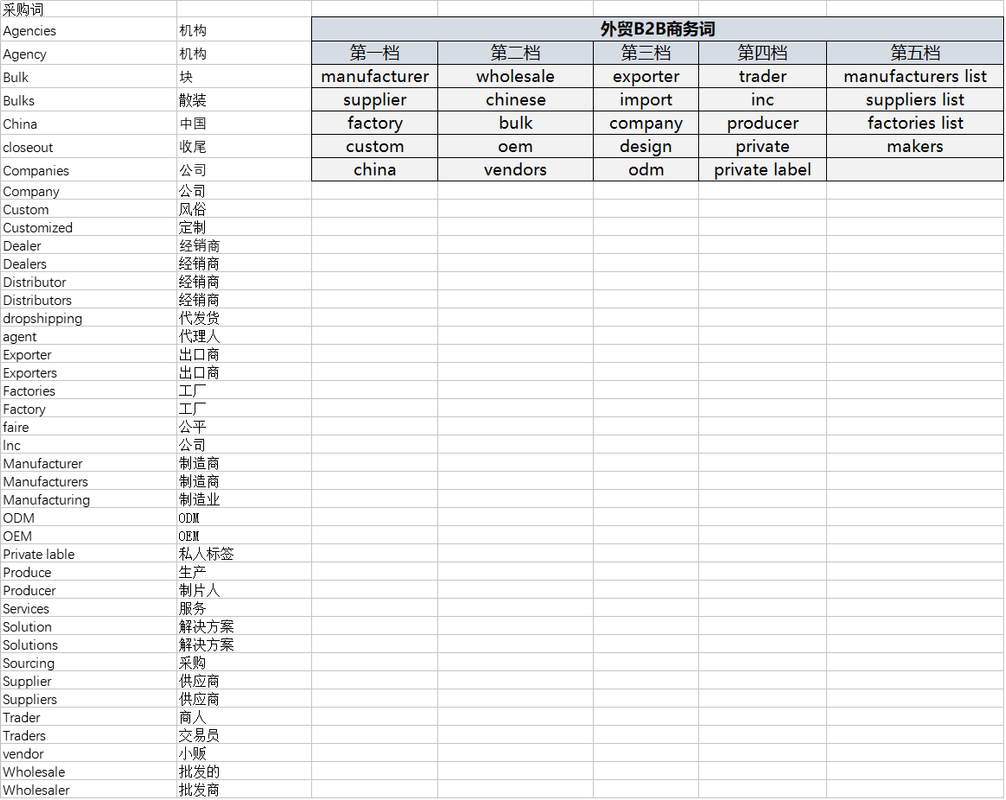
manufacturer
factory
supplier
wholesale
distributor
china
seller
maker
company
dealer
europe
vendor
purchase
import
export
hs code
我这边有一些可以参考
DIVI的默认搜索功能无法搜索产品,咋办?
https://help.elegantthemes.com/en/articles/3030197-how-to-enable-products-and-other-post-types-in-divi-s-search-module
这个代码添加到functions.php,就可以解决这个问题了
你好,如果我想wordpress的网站显示语言是中文,后台的编辑是英文,怎么设置呀?
这种情况下,有一个方式就是,在wordpress后台的Users上找到自己的个人资料,把个人资料的语言设置成英语,就可以实现你的这个想法
请问网站论坛需要什么插件才能实现的?
其实只要把页面的wordpress的默认评论功能给它打开,然后在页面中布局上这个评论元素,就成为了具有论坛功能的页面,大家自由讨论和回复。
就像我的这个讨论页面一样,另外如果用论坛功能的话,其实可以使用二级域名新开一个网站,用Discuz来建这个网站,就是完整的论坛功能。
如何在divi上的菜单加icon图标?
可以参考这个方法,我的这个站就是参考的这个
https://www.learnhowwp.com/how-to-add-icons-to-the-divi-menu/
图标库
https://www.elegantthemes.com/blog/resources/elegant-icon-font
https://www.markhendriksen.com/full-list-of-all-divi-icon-codes/
网站的收录特别慢,post和page发布后,要等很久才能收录,咋回事
你可以使用Google Search Console 网站检查功能,当输入网址后,如果提示没有被收录,你可以点击“请求编入索引”这个按钮,正常你的网站没有被惩罚的情况下,这个手动收录还是蛮有用的,我的一些外贸站,有的时候5分钟就被收录了
你好,请问有没有好用的备份网站的插件,最好是能备份到本地电脑的
我推荐用Duplicator插件
1. 备份简单,只需要简单的设置就可以完成本地的网站备份,可以设置密码,大家备份的大小很大的话,有时会备份不成功,告诉大家一个小技巧,upload这个网站文件夹可以不做备份,剔除后备份文件就变小了。
2. 恢复很简单,只需要根据一个恢复php文件,就可以一直下一步来恢复网站
3. 那个upload文件夹可以在网站恢复好,然后把upload的文件直接覆盖掉就行了。
Daivs, 你好,我也是用了divi主题,我看到别人的菜单有一个效果,我也想实现,就是一级菜单能展开成3列或4列,全屏显示的,我在主题设置里面没找到,请问你知道怎么做吗?
这个哈,很好解决的,因为我自己也经常用,方法:设置菜单的时候,把那个要展开的一级菜单的css选项里面填入“mega-menu”, 就可以实现你说的那个效果,官方的教程有很详细的方法,可以直接查看这个方法:https://www.elegantthemes.com/documentation/divi/mega-menus/
那个我做完正常下拉怎么都是粗体字还有颜色是不是可以单独改浅一点
可以F12 找到css的id,然后修改color 还有字体的css参数设置,例如: font-weight: 500; 这种
youtube的底层流量推荐逻辑是什么?新手做YouTube应该注意什么?
底层逻辑就是你的视频内容是有用的,有价值的,能看的下去的。 youtube后台有一个数据就是每个用户看视频的百分比,例如优秀的视频很多人都能给看90%,没有略过快进之类的, 假设你的是视频大部分用户都看了10%以下,基本看不完就走了,那么谷歌就认为你这个是垃圾的内容,基本是不会给推荐和排名的,所以优质的内容是前提。
新手做的话:别触碰谷歌的规则,不能抄袭别人的是视频,背景或者片段音乐都有版权的,这个要注意,给个小建议给你,youtube有一个免费的音乐库,用那个里面的音乐。 另外视频全部原创自己拍,自己剪辑,剪辑软件可以用Pr,我用的就是这个,希望能帮助到你
想搭建一个综合所有同行的服务&价格&物流等对比信息的网站,方便用户筛选,有可以借鉴的比较成熟的网站吗
这个我建议哈:直接谷歌搜索你的这个服务类型的关键词,查看第一页的搜索结果大家做的网站是什么样的,基本上第一页符合谷歌对于你的搜索意图的分析得出的结论,可以直接借鉴首页的网站,如果大家都是文章页,你就要布局文章页,如果是其他的类型的内容,我们可以直接借鉴来做。
你好,我有一个问题很棘手,客户的留言表单一直发送不成功,很急。。。
但是,如果我登录了我的后台,去测试询盘留言表单的发送功能,每次都测试都成功,这怎么解决呀,站长
这个情况,之前一个朋友跟你一样的情况,如果你装了一个插件是Disable REST API,只要禁用这个立马就解决问题了。你可以试试,原文是https://wordpress.org/support/topic/contact-form-not-sending-if-user-is-not-login/
试试吧
你好,Davis。我去年签约了一家服务商,按照约定,他们做了100个关键词到首页,可是这些词都不合理(因为我们不能指定关键词)。现在一年了,也没收到有效的询盘,偶尔收到的也都是垃圾询盘,推销类的。这种情况怎么办呢?如果直接不要这个网站了,又感觉可惜,花了很多钱呢。。。
你好,这个事情的缘由呢,我在网站的首页有分析这个为啥什么没有询盘,你可以去看一下,网址是:https://vip.ddddseo.site/ ,这种情况,我建议你看能不能要回一些款回来, 另外这个网站其实是废了,不要感觉到可惜。
不如你自己从新建立一个完全属于自己的网站,赶紧吧,时间不等人,走正确的路,有啥疑问可以私我
亲爱的Davis,域名和服务器要怎么选择呢?
1. 域名其实在哪里注册都差不多,但是要选择大公司的,我们走外贸的话,我挺建议用国外的注册商的,不要备案,随时可注册,还保护隐私,我首推荐namesilo,每年现在9.8美金每年一年,包含隐私保护,还是国际知名的注册商,不怕跑路,PS: 我个人注册了十几个域名了,有点上瘾,别学我,捂脸。。
2. 服务器的话,我买过siteground, hostinger, 和cloudways, 都是比较知名的几个。 我最后选择了cloudways, 因为速度相对快,相当于优化后的VPS,有独立ip,外贸人用14.5美金一个月的就行,我放了3个网站,都挺流畅的。
Davis,你好。有没有好用的视频编辑软件分享一下呀,我的诉求是剪辑,配字幕,最好还要配音,需要怎么做呢?非常感谢!
视频剪辑的话,我推荐用Adobe家的Pr软件,这个是专业的视频剪辑,简单上手,属于非常专业级别的。 我们做外贸的只要会操作基本的就行了例如: 剪辑,加文字,加音乐,我认为就可以了,做外贸的视频足够的。 友情提醒一下: youtube更喜欢4K格式的视频哦,未来的考虑,所以请拍一些高清的素材来做,保证效果很好,独家经验,有不明白或者操作细节可以私下找我详细了解
请问wordpress主题应该怎么选?
这个问题其实回答起来,挺简单的,我们就用人数用的最多的那些,因为啥呢,使用过程中遇到疑问能很容易,找到同样问题的前辈解答信息,不推荐用小众的。
目前主流的有Astra, DIVI, Avada 等等, 站长经常使用和本网站使用的都是DIVI
我是第一条评论,大家有问题可以直接提问,我会公开回答大家的问题
如果大家有截图等图片需要辅助的话,可以在
https://postimages.org/
上进行上传,得到一个链接如下,提交上来,就可以展示出来
hao
你好,我遇到了这个问题,截图是这个
https://i.postimg.cc/66D9wWGJ/20200328171343-91414.jpg
请问怎么解决? – 这个是一个例子